What it is
PodForge is a personal research-to-audio studio. You gather sources on one subject into a notebook, ask questions about them, and get answers that point back to the passages they came from. When you want to listen instead of read, it writes a script for two hosts talking it through, lets you edit that script, and renders it as an MP3. It runs on our own machine and is private by design.
Try it
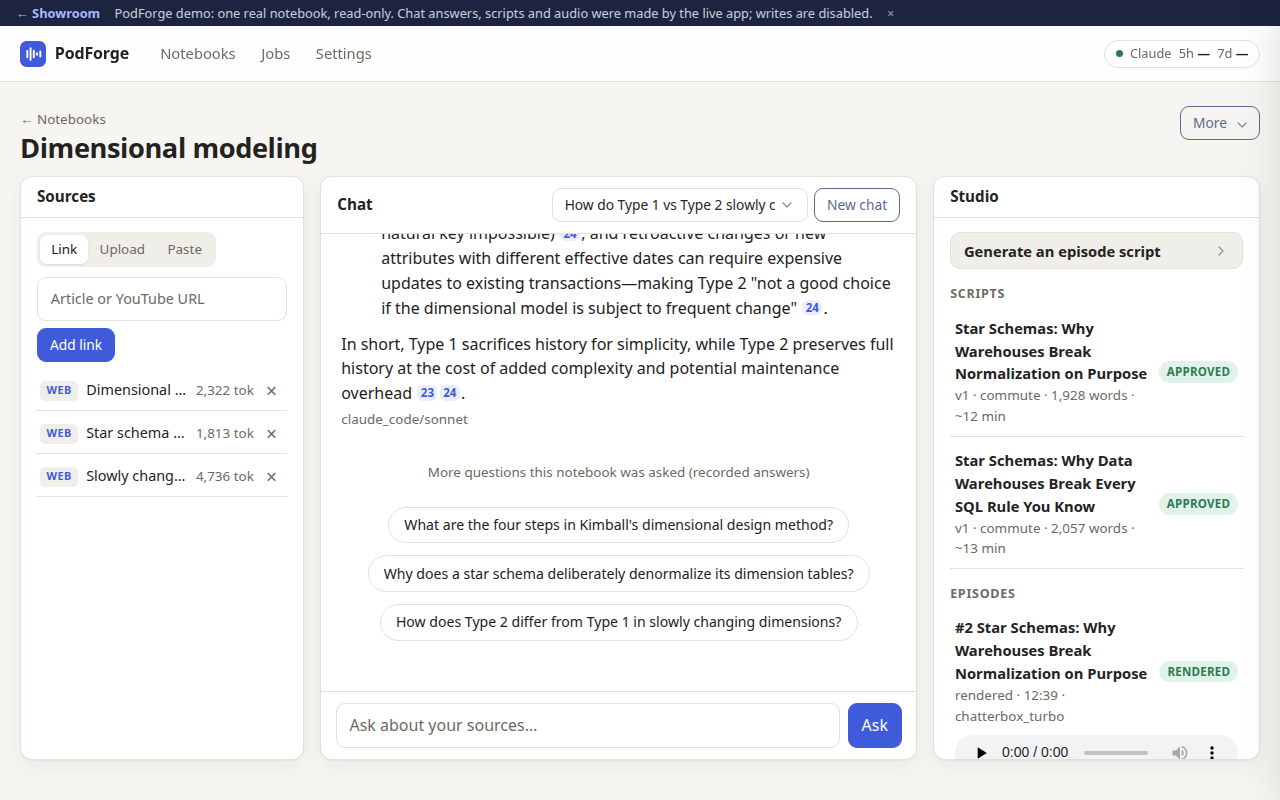
This is the real PodForge interface on a saved copy of one notebook, "Dimensional modeling," built from three Wikipedia articles: sources on the left, a recorded chat answer with numbered citations in the middle, scripts and episodes on the right. Click one of the three suggested questions under the chat to replay the answer the live app gave. Open a script and flip the editor's Markdown toggle. Then play both episodes, one voiced locally with Kokoro and one with the higher-quality Chatterbox voices. Answers, scripts and audio are all real output from the live app. Anything that would change data (adding a source, asking a new question, generating) just shows a "read-only" note. Headphones help.
How it works
- Make a notebook and add sources: web links, YouTube videos, PDFs or pasted text.
- A background worker splits each source into chunks and summarizes it.
- Chat with the notebook; answers stream in with citations to the source text.
- In Studio, pick a format (about 12 minutes or about 30) and a pair of host personas, plus an optional focus.
- It writes an outline, then the script act by act. You edit it, then approve a locked version.
- Render the approved script to an MP3 and play it on the episode page.
What exists today
- Notebooks, source import, cited chat, script editor, jobs page and episode player
- Several host personas and two episode formats
- Local voice rendering, plus a higher-quality voice path on a rented GPU
- A voice comparison set with audition clips
- An early audiobook module
- Several finished episodes made end to end
What isn't there yet
- Not hostable for other people; it needs a signed-in AI command-line tool on the host machine
- The GPU voice step is manual
- No accounts, sharing or publishing feed
- Nothing is committed to version control yet
Under the hood
- Python web app (FastAPI with htmx pages) and a SQLite database
- Writing, chat and summaries are done by calling Claude from the command line, a larger model for scripts and smaller ones for chat and summaries
- Kokoro runs voices locally; Chatterbox runs on a Colab GPU
- Front-end libraries are bundled locally, no outside services at runtime besides the AI